jal
| ← Investments | Contents | Next: Crypto-currency → |
7. Term deposits
A term deposit is money you hand to a bank for a fixed period in exchange for interest. It is still your money, but it is not money you can spend today — so JAL keeps each deposit as an account of its own, of a special type, and gives it a window where everything about it is done in one place.
Everything here is optional. If you have no deposits, skip the chapter.
The deposits window
Reports → Deposits:
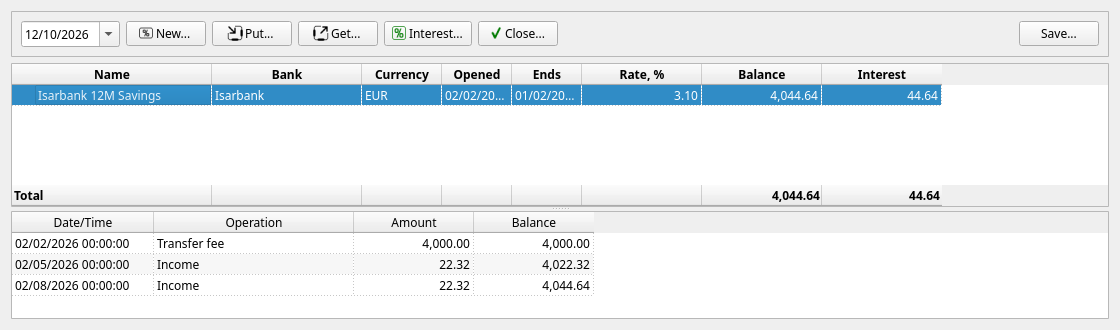
The upper table lists every deposit that was open on the date in the top left corner: its name, the bank, the currency, when it was opened and when it ends, the rate, the balance and the interest it has earned so far. Select one and the lower table shows everything that has happened to it.
The five buttons along the top are the five things a deposit can do.
Opening a deposit
New… asks for everything at once:
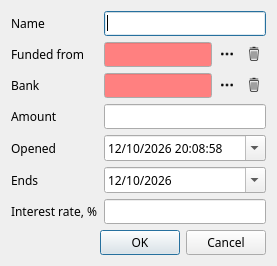
| Field | Meaning |
|---|---|
| Name | What you will call it. Must not clash with an existing account. Right-click the deposit in the list afterwards and choose Rename deposit… to change it, or to give it a picture. |
| Funded from | The account the money comes out of. The deposit takes that account’s currency. |
| Bank | The peer that holds it. Left empty, the funding account’s bank is used. |
| Amount | How much goes in. |
| Opened | When it was opened. |
| Ends | The maturity date. |
| Interest rate, % | The nominal annual rate, for reference. |
OK creates the deposit and records the transfer that funds it. From then on the money shows in the balances panel under Term deposit and no longer under your bank account.
The rate is stored as information. JAL does not calculate interest for you — banks compute it in ways that no program can guess. You record the interest when the bank actually pays it.
Adding to it, and taking money out
- Put… — move more money in from one of your accounts.
- Get… — take some money out, back to one of your accounts.
Both ask for the account, the date and the amount, and both record an ordinary transfer. The account must hold the same currency as the deposit.
Recording interest
When the bank credits interest, press Interest…:
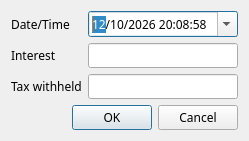
Enter the date, the Interest the bank credited and the Tax withheld from it, if any. JAL writes one operation with two lines — interest into the built-in Interest category, tax into Taxes — so the deposit’s balance rises by exactly what reached it, and both figures appear in your income reports.
Closing it
Close… offers to return the whole balance to an account of your choosing. The amount is filled in with what JAL believes the deposit holds — correct it if the bank paid a last piece of interest you have not recorded yet (better still: record that interest first, then close).
Closing moves the money back and deactivates the deposit. Its history stays; it simply stops appearing in the balances panel and in the deposits list.
Where deposits appear elsewhere
- Balances panel — under the Term deposit group, included in your total.
- Income & spending report — the interest under Profits → Interest, the withheld tax under Spending → Taxes.
- Account balance history — like any other account.
| ← Investments | Contents | Next: Crypto-currency → |