jal
| ← Term deposits | Contents | Next: Importing → |
8. Crypto-currency
This chapter is for people who already hold crypto. It assumes you know what a wallet address, a token and a transaction hash are. If you do not, nothing here is needed — skip to chapter 9.
JAL treats a coin exactly as it treats a share: something you own a quantity of, that has a price and a cost. What is different is where the records come from — JAL can read a public blockchain directly — and that crypto has ways of turning one asset into another that shares do not.
Two kinds of crypto account
| Account type | Use it for | Needs |
|---|---|---|
| Wallet | An address on a blockchain that you control | a Blockchain and an Address attribute |
| Crypto exchange | Coins held for you by an exchange | nothing special |
Create either in Data → Accounts as usual. For a wallet, add the two attributes under Account details: Blockchain (Ethereum, Arbitrum, Bitcoin, Solana, Tron, Hyperliquid, Avalanche, NEAR, Cardano, Polkadot) and Address — the address exactly as the chain shows it. JAL refuses to create a wallet without both, and — on the chains it knows how to check — verifies that the address really belongs to that chain, so a typo cannot silently produce a wallet that fetches nothing.
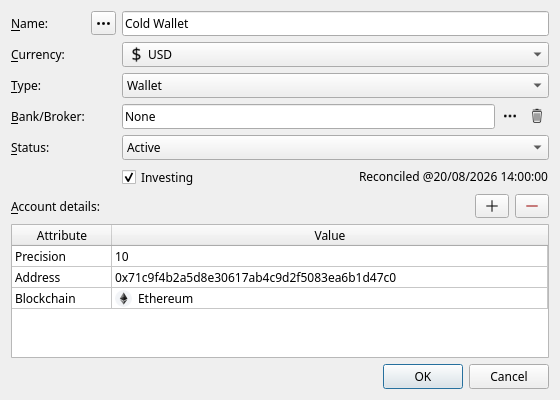
A Bitcoin wallet may hold an extended public key (
xpub…) instead of a single address; JAL then follows every address the key generates. An extended public key cannot spend anything, but it does reveal your entire wallet history to anyone who has it — keep your database to yourself.
The wallet’s currency should be the coin’s usual quote currency (USD for most). One account per address per chain.
NEAR, Cardano and Polkadot wallets are kept by hand: JAL knows these chains — the account, the price of its coin and its logo all work — but has no reader for them, so their operations are entered manually. Put the transaction hash into the operation’s Number field: a reader written for the chain one day will then recognize what you have already entered instead of importing it a second time.
Reading a wallet from the blockchain
Import → Blockchain → … and pick the chain:
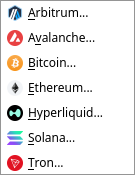
If you have more than one wallet on that chain, JAL asks which of them to read. It then downloads everything that has happened at those addresses since the last time you asked, and turns it into operations: transfers in and out, swaps, wrappings, staking rewards, and the gas each of them cost. Each wallet remembers how far it was read, so the next fetch continues from there instead of starting over.
API keys
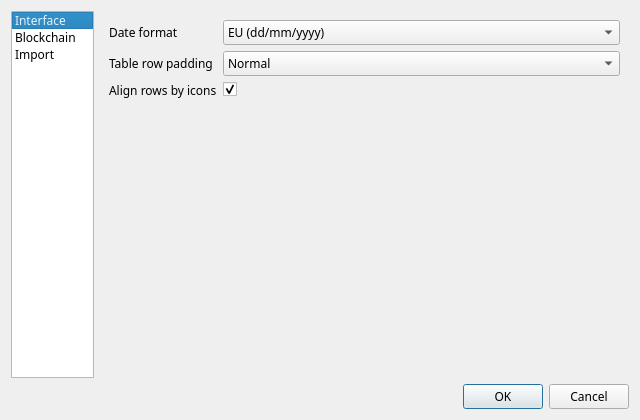
The public explorers that serve this data ask for a free key. Without one, most of them refuse almost every request. Put your keys in Settings → Preferences → Blockchain:
| Key | Needed for | Where to get it |
|---|---|---|
| Etherscan API key | Ethereum and Arbitrum | etherscan.io |
| Routescan API key | Avalanche C-chain | routescan.io |
| Helius API key | Solana | helius.dev |
| TronGrid API key | Tron | trongrid.io |
Bitcoin and Hyperliquid need no key.
Token lists and unwanted tokens
Anyone can send anything to your address, and scam tokens with copied names are common. JAL defends against that in two ways:
- Import → Download token lists fetches the public lists of tokens that are known to be genuine (Uniswap, CoinGecko, Jupiter and others). A token that is on such a list is imported normally.
- Everything else is judged. An arrival worth less than the Dust airdrop threshold (Preferences → Blockchain, in your account currency) from an address you have never dealt with is treated as an unsolicited airdrop and is not imported at all.
Tokens that were refused are listed in Data → Token blacklist, with the chain, the address and whether JAL blacklisted it by itself. Delete a row there and the next fetch will import that token after all.
The four crypto operations
Beside the ordinary Buy/Sell and Transfer, crypto needs four more. For the three that move value, two questions decide which one fits: was the asset disposed of at a market price, or does its cost simply carry over? and did it stay on one account, or cross to another?
| cost carried over | disposed of at market | |
|---|---|---|
| one account, one moment | Wrapping | Swap |
| two accounts, two moments | Bridge (same asset only) | Swap with Cross chain |
The fourth, Action, records a transaction that moved no value at all.
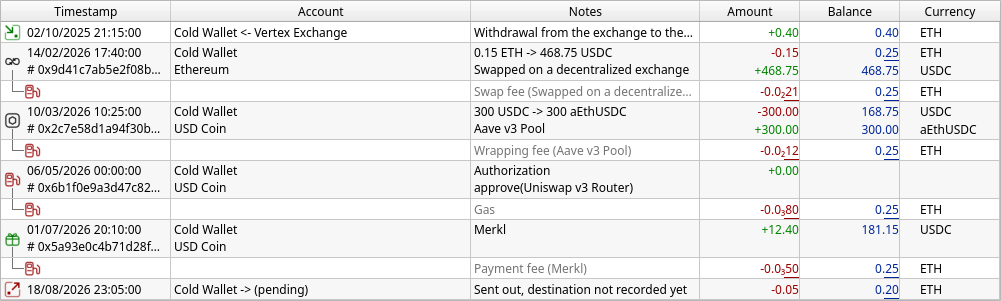
A wallet’s operations read a little differently from a bank account’s, as the picture shows. An
operation that touches two assets keeps both in one row — the ETH that left above the USDC that
arrived — and the gas it cost is a row of its own below it, with the fuel-pump icon and the
operation’s own note in brackets. Rows of one transaction are drawn as a group, tied under the first
one (see chapter 4). Amounts too small for two decimals are written compactly (0.0₂21 is 0.0021), and an
underlined figure is a rounded one you can hover over to see in full; both are explained in
chapter 4.
Swap — one asset exchanged for another
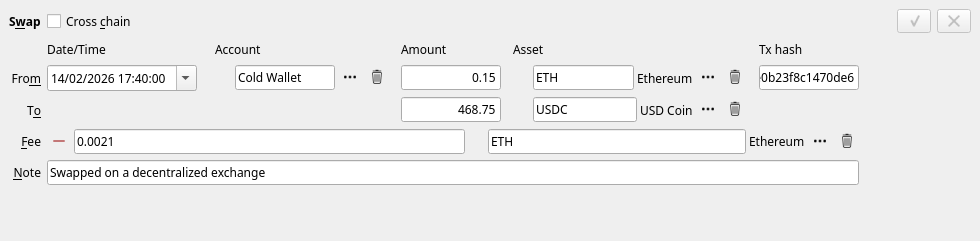
You gave up X of one asset and received Y of another, at whatever rate the market gave you: ETH for USDC on a decentralised exchange. It is a sale and a purchase in one, and it realises a profit or a loss on what you gave up, exactly as selling for cash would.
Press + next to Fee to record the gas, and choose the coin it was paid in. Tick Cross chain when what you received arrived on a different account (a different chain) and possibly minutes later — the lower line then gets its own date and account.
Wrapping — one asset becoming another, at no gain
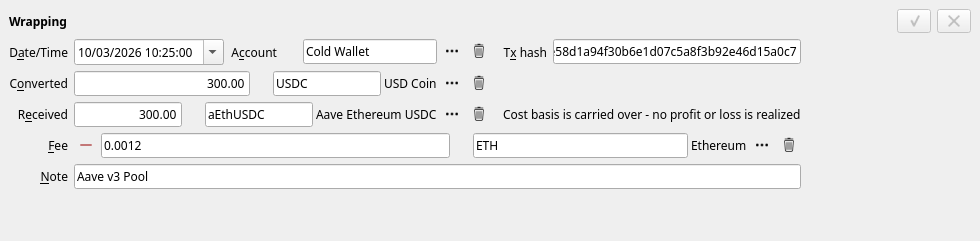
Sometimes an asset merely changes form: depositing into a lending protocol and getting a receipt token back (supply / withdraw), staking a coin for its liquid-staking equivalent (stake / unstake), wrapping ETH into WETH. Nothing has been realised — you own the same position in a different wrapper — so JAL carries the cost basis across and books no profit. The editor says so on its own face. The quantity may still change (a vault share is not worth exactly one coin); that is not a gain or a loss, and not an error.
A wrapping names the venue it went through when one side of it is a receipt token whose asset carries the protocol attribute (see chapter 6): the row reads Supply to Aave v3, Withdraw from Fluid, or Move: A -> B when a position moves between two protocols. When neither side is marked it is simply called Wrapping. Imports also write the name of the protocol into the note.
A protocol that gives no receipt token back — Aave v4 — has nothing to wrap into: the supply is a transfer into a staked position instead, see Lending with no receipt token.
Choosing Wrapping where a Swap belongs (or the other way round) is the one modelling mistake here that matters, because it decides whether a taxable profit exists.
Bridge — the same asset, another chain
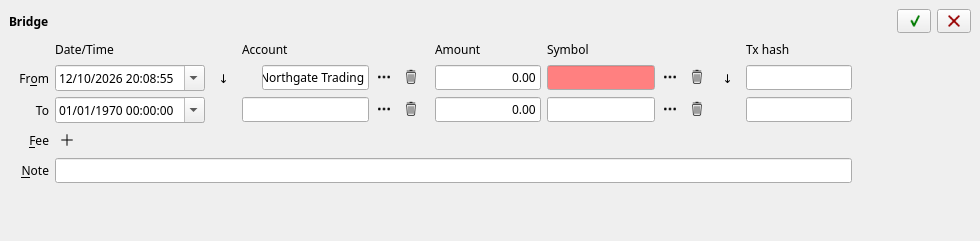
USDC leaving Ethereum and arriving on Arbitrum is still USDC. A bridge records the departure and the arrival as two ends of one movement, with the cost carried across and no profit realised.
The two ends are often fetched at different times, from different chains. JAL therefore accepts a half bridge — the departure alone — and shows the other end as pending. When the arrival turns up, right-click the operation and choose Match cross-chain legs…; JAL looks for the matching leg itself (asking the bridging service that routed it, where it can) and offers what it found.
Action — a transaction that moved nothing
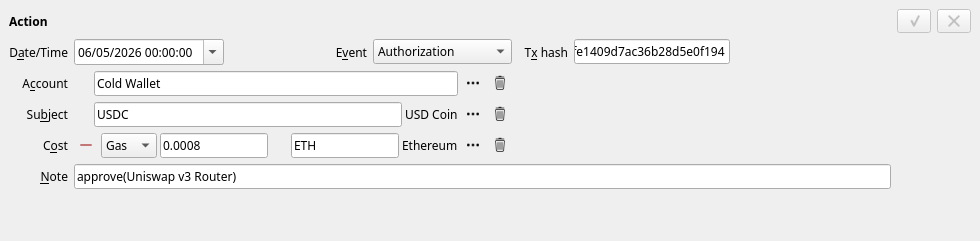
Some transactions cost gas without moving any value: approving a contract to spend a token, a call that failed, a command to a position such as starting an unstaking cooldown. Such a transaction is an Action. It has an Event (its type, below), the Tx hash, the Account that signed it, optionally the Subject asset it concerned, and its Cost — the gas, or on Solana the rent.
| Event | What it is |
|---|---|
| Authorization | A right granted to a contract — an ERC-20 approval, an operator switched on |
| Failed transaction | It reverted. Its description is struck through; the gas was still spent |
| Position command | A command to a position that moves nothing by itself — a cooldown, an unstake request |
| No-op | It did what was asked and nothing moved — a claim that claimed zero |
| Contract call | Anything the import cannot yet tell apart |
| Token account rent | Solana coins locked as the deposit for holding a token. Shown as Rent, not gas, because it comes back when the token account is closed |
Gas that did buy something is not an Action: it is the fee of the swap, wrapping, bridge,
transfer or reward claim it paid for, and appears under it. The note of an imported Action names the
call it made — approve(Chainlink CCIP Router), cooldown() @ Aave Safety Module.
Transfers with one end missing
The same applies to plain transfers: a fetch sees coins leaving your wallet and cannot know where they went. Such half-transfers are collected in Reports → Unsettled transfers:

Right-click a row (or use the buttons) and tell JAL what it really was:
- Assign an account… — the other end is an account of yours;
- Assign a staked position… — the coins went into staking (see below);
- Match with another leg… — pair it with the opposite leg already recorded;
- Convert into a swap… / Convert into a bridge… — it was really one of those;
- Record as a spending or an income… — money whose other end was a person, not an account;
- Write off as dust… — an unsolicited crumb not worth recording.
Working this list down to empty is the routine after a fetch. Until you do, JAL knows the coins left but not what they became.
Staking
Coins that are staked have left your wallet but are still yours. JAL keeps them in a staked position — an account of a hidden type that holds the asset on the wallet’s behalf, the same idea as a term deposit box.
You create one by settling the transfer that staked the coins: find that leg in Unsettled transfers, right-click, Assign a staked position…, and name the position (the validator, the protocol, the venue). Unstaking is settled the same way, in the opposite direction.
Reports → Staked positions then lists what is staked where, what it is worth, and — for the venues whose balances JAL can read on chain — how much the position has accrued but not yet paid out. Rewards that were paid out arrive in your wallet and are recorded there as an Asset Income of type Staking reward.
Lending with no receipt token (Aave v4)
Aave v4 hands nothing back when you supply: the coins go to one of its Hubs and the position is only a figure kept by the Spoke you used. With no receipt token to hold, JAL treats it exactly like staking:
- a supply is fetched as a transfer out of the wallet, marked
[custody] Aave v4 Main Spoke. Settle it once with Assign a staked position…, creating the position on Ethereum at the address the transfer went to (the Hub). Every later supply and withdrawal then finds that position by itself; - the position is listed in Staked positions, and its Accrued column shows the interest earned so far once the balances are read (Import → Download quotes… with Ethereum ticked);
- a withdrawal is your own money coming back until everything you supplied has returned. Only what comes back beyond that is interest, recorded in the wallet as an Asset Income of type Lending interest. So a partial withdrawal shows no income; the interest appears with the withdrawal that takes out the last of what you put in, and with any after it.
Keep one asset per position for now: its on-chain balance is read only while the position holds a single asset.
Currently the Main Spoke of the Core Hub on Ethereum is known. A supply made through another Spoke stops the fetch at that transaction, saying Aave v4 Core Hub reached through an unregistered contract, rather than recording it as an ordinary transfer; nothing is lost, and the fetch picks it up from there once a version of JAL that knows the Spoke is installed.
Wrapped positions
A receipt token held in the wallet itself — an aToken, a vault share, a liquid-staking coin — is a position too, and the same report lists it: one row per wallet and receipt token whose asset carries the protocol attribute. Staked since is the date of the oldest lot still held, and Accrued is filled only for a rebasing token (one whose quantity grows); a share token grows in price instead, and that is already in its Value. These positions stay in the Asset Portfolio as well, which is where their cost and unrealised profit are shown.
A position is named when it is created, from whatever the import recognised, and that guess is usually worth correcting: right-click the row and choose Rename position… to give it a name of your own and a picture.
Rewards waiting to be claimed
Some rewards are not paid into the wallet at all until you claim them — a Merkl campaign, or the rewards of Aave’s Safety Module. They are earned money that has not arrived, so JAL lists them in the same report, one row per wallet, asset and distributor, with the amount in the Accrued column and no position behind it.
They are read from the chain together with the balances, by Import → Download quotes… with the chains ticked. Right-click such a row for Show claim history — how the owed amount has grown since JAL started watching it. Nothing is booked: when you finally claim, the coins arrive in the wallet and are recorded as the income they are, with the claim’s gas as its fee.
Crypto prices
Crypto prices come from DeFiLlama and need no key. They are downloaded with everything else through Import → Download quotes…; tick the chains and Crypto exchange among the sources.
A coin that lives on no chain JAL supports (or that you hold on an exchange) is priced through its CoinGecko id, which you put in the asset’s attributes — see chapter 6.
Income types you will meet
Blockchain imports create Asset Income operations of kinds an ordinary investor never sees:
| Type | What it is |
|---|---|
| Staking reward | Coins earned by staking or lending |
| Reward | Coins received for something else — a referral, a rebate, a bonus |
| Dust attack | An unsolicited crumb, recorded so the balance still matches the chain |
| Rebase adjustment | Quantity a rebasing token gained with no transaction behind it |
| Token account rent returned | Solana’s token-account deposit coming back (the deposit itself is an Action) |
You will rarely create these by hand; the fetchers do it. Gas is no longer a type of its own: it is the fee of whatever it paid for, or the cost of an Action.
| ← Term deposits | Contents | Next: Importing → |