jal
| ← Settings and maintenance | Contents | Next: Glossary → |
13. When something looks wrong
First: read the log
The logs button in the bottom left corner opens the panel where JAL says what it has been doing and what it did not like. The last message is always shown on the status bar beside the button, in grey, orange or red.
Right-click inside the panel to Copy its contents (useful when reporting a problem), to Select all, or to Clear it.
Messages you may see
The ones below are those you are most likely to meet. A terse list of every message JAL can write is kept in Description of error messages.
“There are no quote/rate for ACME (EUR) 12/05/2026”
JAL needed a price, or an exchange rate, for that asset on that day and has none. Whatever depended on it is shown as zero or valued at an older price.
Fix: Import → Download quotes… for a period covering that date. If the asset is one JAL cannot download (an unlisted fund, a private holding), add the price by hand in Data → Quote history.
“Statement ending balance doesn’t match: … 1901.30 (act) <> 1903.75 (exp)”
An imported statement’s closing balance differs from JAL’s own figure for that account. Something in your records is missing, duplicated or wrong — often an operation entered by hand that the statement also contains, in a slightly different form.
Fix: compare the account’s operations with the statement around the dates involved. Until they agree, the account stays unreconciled.
“Operation already present in db and was skipped”
Not a problem: you imported something that was already there, and JAL declined to duplicate it. Usual when statements overlap.
“No account is set for … import — choose one in Settings, Preferences, Import”
A Trading 212 or Revolut export names no account, so JAL has to be told which of yours it is about.
Fix: Settings → Preferences → Import and pick the account — see chapter 9. The account has to be in the same currency as the statement, or the import stops saying so.
“Statement balance doesn’t match its own operations”
A Revolut export states a running balance on every row, and JAL checks each step against the amount and the fee of that row. When they disagree the file is not what JAL takes it for, so nothing is imported.
Fix: export the period again, unedited. If a fresh export fails the same way, report it — see Reporting a problem below.
“Results value of corporate action doesn’t match 100 % of initial asset value. Date: …”
A split, merger or spin-off does not say where all of the original cost went. JAL cannot continue the ledger past it.
Fix: find that corporate action in the operations list and set the Share, % of each resulting asset so that they total 100. For a US spin-off, the company publishes the split in a Form 8937.
“Asset amount is not enough …” / “Open position was expected but not found”
An operation disposes of more of something than the account is recorded as holding — a sale before its purchase, a transfer of shares that never arrived, an import missing its first half.
Fix: look at that account and asset around the date in the message, and add what is missing (the opening purchase, the incoming transfer). The ledger stops at this operation until you do, so balances after it are not to be trusted.
“Ledger is incomplete, it stopped at …”
The summary of the above: something raised an error and everything after that moment is not computed. Fix the operation the log complains about, then Ledger → Re-build ledger….
“import stopped at an unsupported transaction (…); it will be retried next time”
A blockchain fetch met a transaction it cannot classify and stopped there instead of guessing. Everything before it was imported; that transaction and all later ones are fetched again next time. The text in brackets says why. With Aave v4 Core Hub reached through an unregistered contract 0x… you supplied to (or withdrew from) Aave v4 through a Spoke or gateway this version of JAL does not know — see chapter 8.
Fix: nothing in your data is wrong and nothing is lost. Update JAL; if the newest version still stops there, report it with the bracketed text — the contract address in it is what has to be added.
“Open lots don’t add up to the position, check the account precision”
The account counts fewer decimals than the asset needs — typically a crypto account left at the default of 2. Fix: open the account, set Precision in Account details to something adequate (8–10 for crypto), and rebuild the ledger.
“Database data may be inconsistent after recent update. Rebuild it now?”
Shown after an upgrade that changed how something is computed. Answer Yes.
“Tax adjustment for dividend: 12.30 → 10.80”
Information only: a broker retrospectively changed the tax withheld on a dividend, and the import has followed it.
Things that look wrong but are not
My balance is red. That is the reconciliation reminder, not an error — nobody has confirmed the account against a statement lately. See chapter 5.
A card shows more than I have. Credit limits are added to card balances by default. Right-click the balances panel and untick Use credit limits.
The portfolio shows an old price. JAL values what it can with the newest price it has. Download quotes.
Totals are in the wrong currency. The reporting currency comes from Data → Residence (chapter 3).
An account has disappeared. It is probably closed, or set to background. Widen Show accounts in the balances right-click menu — a background account is folded into the Background group at the bottom of the panel — or tick Show closed in Data → Accounts.
Frequently asked questions
Which systems does JAL run on? Anywhere Python and Qt run: Linux, Windows, macOS. Some environments are awkward — Windows on ARM has trouble building numpy, one of JAL’s dependencies.
I typed pip install jal into Python and got a SyntaxError.
That command belongs in a terminal, not in the Python shell. If you see >>>, type exit() first,
then run it. See chapter 2.
How do I start over with a clean database?
Ledger → Delete all data…, or close JAL and delete jal.sqlite yourself (the path is in
Help → About JAL). Back it up first if there is any chance you will want it back.
Can I use JAL on two computers? Yes, if only one of them uses it at a time: put the database in a synced folder (chapter 2), and let the sync finish before opening JAL on the other machine. Never write from both at once.
Can two people share one database?
No. JAL is single-user. Two people who want separate books should use two database files (and can
switch between them with jal.ini).
Does JAL send my data anywhere? No. It contacts price sources and blockchain explorers when you ask it to, and asks them only for public information: a ticker’s price, an address’s transactions. Nothing about you is uploaded.
Do I have to enter every coffee? No. Many people record only what matters to them — bank and card operations, investments — and leave cash roughly. JAL’s reports are as detailed as what you put in.
Reporting a problem
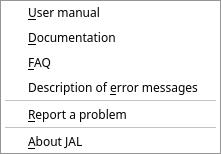
Help → Report a problem opens the project’s issue tracker. Please include:
- what you did and what happened;
- the version, from Help → About JAL;
- the relevant part of the log (right-click → Copy);
- for an import problem, the kind of statement and the broker — without your personal data in it.
You can also write to jal@gmx.ru or to the Telegram group.
Broker statement formats change without notice, and a report from someone who has the new format is often the only way that gets fixed.
| ← Settings and maintenance | Contents | Next: Glossary → |